Secure Password Generator Tool – Create Strong Passwords
- Home
- Secure Password Generator Tool – Create Strong Passwords
Password Generator & Strength Checker
Password Generator Tool
Introduction
In today’s digital world, passwords are the first line of defense against cyber threats. From email accounts and banking portals to WordPress dashboards and cloud storage, every online platform requires secure login credentials. Weak passwords remain one of the leading causes of data breaches worldwide. That’s why using a reliable Password Generator Tool is essential for protecting your personal and business data.
Our secure password generator is designed to help you create strong, random passwords that are difficult to guess or crack. Whether you are a blogger, developer, marketer, or agency owner, this tool simplifies password creation while ensuring maximum security.
What Is This Tool?
The Password Generator Tool is an online utility that automatically creates secure and complex passwords based on your selected preferences. Instead of manually thinking of combinations that may be predictable or reused, this tool generates truly random strings of characters.
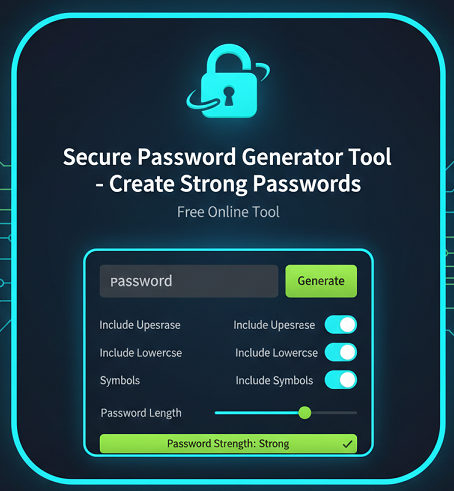
You can customize password length, include uppercase and lowercase letters, add numbers, and incorporate special symbols to enhance strength. The result is a unique password that significantly reduces the risk of brute-force attacks and unauthorized access.
How the Tool Works
The tool uses randomized character algorithms to produce unpredictable combinations. When you choose your preferred length and character types, the generator selects characters from secure character sets and combines them in a random order.
This ensures:
- No predictable patterns
- No dictionary-based combinations
- Balanced mix of character types
- High entropy for better protection
The password is generated instantly within your browser session, ensuring speed and convenience.
Key Features
- Custom password length selection
- Option to include uppercase letters
- Option to include lowercase letters
- Include numbers for stronger combinations
- Add special symbols for maximum complexity
- Instant password generation
- User-friendly interface
- Free and accessible online
Why Use This Tool?
Many users create passwords using names, birthdays, or common phrases. Unfortunately, these are easy targets for hackers using automated tools. A secure password generator eliminates guesswork and reduces human error.
Using this tool helps you:
- Avoid weak and repeated passwords
- Strengthen account protection
- Improve overall cybersecurity hygiene
- Protect WordPress admin dashboards
- Secure email and financial accounts
Step-by-Step Usage Guide
- Choose your desired password length (recommended: 12–16 characters or more).
- Select character types (uppercase, lowercase, numbers, symbols).
- Click the “Generate Password” button.
- Copy the generated password.
- Store it securely in a password manager.
Benefits for SEO and Marketing
Strong passwords are not only about personal safety; they also protect websites and digital assets. If you manage a WordPress SEO tools website, weak admin credentials can lead to hacked content, SEO penalties, and data loss.
By using a secure password generator:
- You reduce the risk of unauthorized content changes.
- You prevent spam injections that harm search rankings.
- You protect customer data and maintain brand trust.
- You ensure business continuity without downtime.
Use Cases
For Bloggers
Protect your WordPress login and hosting accounts with strong passwords to prevent content tampering.
For SEO Experts
Secure client dashboards, analytics tools, and reporting systems from unauthorized access.
For Agencies
Generate unique passwords for multiple client projects and team members.
For Developers
Create secure credentials for databases, FTP accounts, and server access.
FAQ Section
1. What is a strong password?
A strong password contains a mix of uppercase letters, lowercase letters, numbers, and special symbols. It should be at least 12–16 characters long and avoid personal information or dictionary words.
2. How do I create a secure password?
You can create a secure password by using an online password generator tool that randomizes characters and allows customization for maximum complexity.
3. Is a 12-character password secure?
Yes, a 12-character password with mixed character types is generally secure. However, longer passwords provide even stronger protection.
4. Are online password generators safe?
Reputable online password generators operate locally in your browser and do not store generated passwords. Always use trusted platforms.
5. How often should I change my passwords?
It is recommended to update important account passwords every 3–6 months or immediately after a security concern.
6. Should I use special characters in my password?
Yes, including symbols increases password complexity and makes it harder to crack.
7. Can hackers guess random passwords?
Randomly generated passwords with sufficient length and complexity are extremely difficult to guess using brute-force methods.
8. What is the ideal password length?
Most security experts recommend at least 12–16 characters. For sensitive accounts, 20+ characters provide stronger protection.
9. Can I use the same password for multiple accounts?
No, each account should have a unique password to prevent widespread damage if one account is compromised.
10. Do I need a password manager?
A password manager securely stores complex passwords and helps you manage multiple accounts safely.
Conclusion
A strong password is one of the simplest yet most powerful ways to protect your digital presence. Our Password Generator Tool helps you create secure, complex, and random passwords instantly. Whether you manage a personal blog, business website, or multiple client accounts, using strong passwords significantly reduces security risks and strengthens your online protection strategy.
Related Tools
- AI Image Background Removal – Powerful Reasons Why You Should Stop Paying for Background Remover Tools
- All Email & Phone Extractor from any URL – Extract Contacts Easily
- All Email Extractor from Any URL – Free Online Tool
- Base64 & URL Encode/Decode Tool – Free Online Converter
- Check If URL Is Allowed in Google Search Results
- Disclaimer
- Domain Expiry Checker – Check Domain Expiration Date
- Domain Name Extractor in Paragraph, Text, URL | SEO Tool
- Free AI Image Background Removal Tool Online
- Free AI Text to Speech Tool
- Free Color Picker & Gradient Generator Tool Online
- Get Meta Data Information of Any Website Online
- Google Index Checker – Check Website Index Status
- Google Review Link Generator – Create Direct Review URLs
- Image Editor That Actually Works – Crop, Text, Filters & Stickers
- Image Resizer Tool – Resize Images Online for Free
- Interactive Anchor Text & Hyperlink Generator Tool
- JSON Formatter, Validator & Minifier Tool Online
- Keyword Difficulty Checker Pro Tool - Analyze & Improve SEO Rankings
- Keyword Rank Checker Tool - Track Your SEO Rankings Accurately
- Live Canonical Checker AI Tool – Check Canonical Tag in head
- Open Graph & Twitter Card Tags Checker Tool Online
- Page Score, HTML Tag & Scheme Analysis
- Photo Censor Tool | Pixelate Images Easily
- Privacy Policy
- Remove Line Breaks & Extra Spaces Tool Online
- Schema Markup Generator Shortcode - Full Version | SEO Tool
- Secure Password Generator Tool – Create Strong Passwords
- SEO Title & Meta Description Tester | SERP Preview Tool
- Snow Calculator Expectation – Snowfall Forecast Tool
- Speak to Text & Text to Speech – Free AI Voice Over Generator with Download (No Signup)
- Terms and Conditions
- Text Case Converter Tool – Change Uppercase & Lowercase
- Text Counter – Word, Character & Sentence Counter Tool
- URL Link Extractor & Hyperlink Counter Tool Online
- URL Shortener – Create Clean, Trackable Short Links
- Website Header Response Checker – HTTP Status Tool
- XML & HTML Sitemap Generator – Free Download Tool
- YouTube Video Details & Thumbnail Downloader Tool
Read Our Latest Insights
We help you see the world differently, discover opportunities you may never have imagined and achieve results that bridge what is with what can be.